Cisco Packet Tracer Commands
Networking
Terminal type of modes
We can have EXEC Mode, Privileged EXEC Mode, Global Configuration Mode, Interface Configuration.
# User EXEC Mode
# This is the initial mode after logging in. Limited to basic monitoring commands.
Switch>

# Privileged EXEC Mode
# Provides access to all monitoring commands and some configuration commands. Use 'enable' to enter this mode from User EXEC Mode.
Switch> enable
Switch#

# Global Configuration Mode
# Allows configuration changes to the device. Use 'configure terminal' to enter this mode from Privileged EXEC Mode.
Switch# configure terminal
Switch(config)#

# Interface Configuration Mode
# Used to configure specific interfaces (e.g., VLANs, Ethernet ports). Enter this mode from Global Configuration Mode.
Switch(config)# interface vlan 1
Switch(config-if)#

# Line Configuration Mode
# Used to configure console, AUX, and VTY (Telnet/SSH) lines. Enter this mode from Global Configuration Mode.
Switch(config)# line console 0
Switch(config-line)#

# To return to Global Configuration Mode from a sub-mode (e.g., Interface or Line Configuration Mode)
Switch(config-if)# exit
Switch(config)#

# To return to Privileged EXEC Mode from Global Configuration Mode
Switch(config)# exit
Switch#

# To return to User EXEC Mode from Privileged EXEC Mode
Switch# disable
Configure Hostname
Switch# configure terminal
Switch(config)# hostname Sw-Floor-1
Sw-Floor-1(config)#
Set Password
Sw-Floor-1# configure terminal
Sw-Floor-1(config)# line console 0
Sw-Floor-1(config-line)# password cisco
Sw-Floor-1(config-line)# login
SW-Floor-1(config-line)# end
Sw-Floor-1#
To secure privileged EXEC access, use the enable secret password global config command:
Sw-Floor-1# configure terminal
Sw-Floor-1(config)# enable secret class
Sw-Floor-1(config)# exit
Sw-Floor-1#
Configure VTY Lines
Virtual terminal (VTY) lines allow remote access through Telnet or SSH to the device:
Sw-Floor-1# configure terminal
Sw-Floor-1(config)# line vty 0 15
Sw-Floor-1(config-line)# password cisco
Sw-Floor-1(config-line)# login
Sw-Floor-1(config-line)# end
Sw-Floor-1#
Encrypt Passwords
Startup-config and running-config files show most passwords in plain text, which is a security threat. Use the following command to encrypt passwords:
Sw-Floor-1# configure terminal
Sw-Floor-1(config)# service password-encryption
Sw-Floor-1(config)#
Use the show running-config command to verify that the passwords are now encrypted:
SW-Floor-1(config)# end
Sw-Floor-1# show running-config
!

!
line con 0
password 7 094F471A1A0A
login
!
line vty 0 4
password 7 03095A0F034F38435B49150A1819
login
!
!
end
Warning Messages
Set up a warning message using the banner command:
Sw-Floor-1# configure terminal
Sw-Floor-1(config)# banner motd #Authorized Access Only !#
Configuration Files
- startup-config: This is the saved configuration file stored in NVRAM. It contains all the commands that the device will use on startup or reboot. Flash does not lose its content when the device is powered off.
- running-config: This is stored in Random Access Memory (RAM). It reflects the current configuration. Modifying a running configuration affects the operation of a Cisco device immediately. RAM is volatile and loses all content when the device is powered off or restarted.
To save the running configuration to the startup configuration:
copy running-config startup-configModify Running Configuration
Use the reload command to remove a configuration:
reloadTo erase the startup configuration:
erase startup-configManual IP Address Configuration for End Devices
Configure Switch Virtual Interface
Sw-Floor-1# configure terminal
Sw-Floor-1(config)# interface vlan 1
Sw-Floor-1(config-if)# ip address 192.168.1.20 255.255.255.0
Sw-Floor-1(config-if)# no shutdown
Sw-Floor-1(config-if)# exit
Sw-Floor-1(config)# ip default-gateway 192.168.1.1
Static Routing
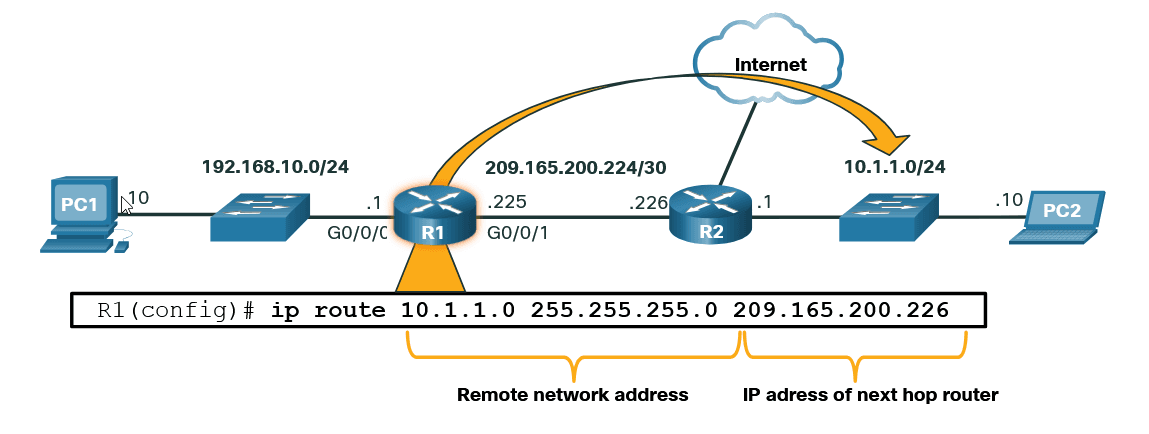 R1 is manually configured with a static route to reach the 10.1.1.0/24 network. If this path changes, R1 will require a new static route.
ip route 10.1.1.0 255.255.255.0 209.165.200.226Basic Steps in Configuring a Router
Configure Hostname
Router(config)# hostname R1Secure the Privileged EXEC Mode
Router(config)# enable secret classSecure the User EXEC Mode
Router(config)# line console 0
Router(config-line)# password cisco
Router(config-line)# login
Secure Remote Access via Telnet and SSH
Router(config)# line vty 0 4
Router(config-line)# password cisco
Router(config-line)# login
Router(config-line)# transport input {ssh | telnet}
Protect All Passwords in the Configuration File
Router(config-line)# exit
Router(config)# service password-encryption
Provide a Legal Notification
Router(config)# banner motd #Authorized Access Only !#Save the Configuration
Router(config)# end
Router# copy running-config startup-config
Configuring Router Interfaces
At this point, the routers have their basic configurations. The next step is to configure their interfaces because end devices cannot reach the routers until the interfaces are configured. There are many different types of interfaces for Cisco routers. For example, the Cisco ISR 4321 router is equipped with two Gigabit Ethernet interfaces:
- GigabitEthernet 0/0/0 (G0/0/0)
- GigabitEthernet 0/0/1 (G0/0/1)
Configuring a router interface is very similar to configuring a management SVI on a switch. Specifically, it involves issuing the following commands:
Router(config)# interface type-and-number #example: interface s0/0/0
Router(config-if)# description description-text
Router(config-if)# ip address 192.68.101.2 255.255.255.0
Router(config-if)# ipv6 address ipv6-address/prefix-length
Router(config-if)# no shutdown
Example:
R1> enable
R1# configure terminal
Enter configuration commands, one per line.
End with CNTL/Z.
R1(config)# interface gigabitEthernet 0/0/0
R1(config-if)# description Link to LAN
R1(config-if)# ip address 192.168.10.1 255.255.255.0
R1(config-if)# ipv6 address 2001:db8:acad:10::1/64
R1(config-if)# no shutdown
R1(config-if)# exit
R1(config)#
*Aug  1 01:43:53.435: %LINK-3-UPDOWN: Interface GigabitEthernet0/0/0, changed state to down
*Aug  1 01:43:56.447: %LINK-3-UPDOWN: Interface GigabitEthernet0/0/0, changed state to up
*Aug  1 01:43:57.447: %LINEPROTO-5-UPDOWN: Line protocol on Interface GigabitEthernet0/0/0, changed state to up
R1(config)#
R1(config)# interface gigabitEthernet 0/0/1
R1(config-if)# description Link to R2
R1(config-if)# ip address 209.165.200.225 255.255.255.252
R1(config-if)# ipv6 address 2001:db8:feed:224::1/64
R1(config-if)# no shutdown
R1(config-if)# exit
R1(config)#
*Aug  1 01:46:29.170: %LINK-3-UPDOWN: Interface GigabitEthernet0/0/1, changed state to down
*Aug  1 01:46:32.171: %LINK-3-UPDOWN: Interface GigabitEthernet0/0/1, changed state to up
*Aug  1 01:46:33.171: %LINEPROTO-5-UPDOWN: Line protocol on Interface GigabitEthernet0/0/1, changed state to up
R1(config)#
Verify the configuration:
show ip interface briefR1# show ip interface brief
Interface IP-Address OK? Method Status Protocol
GigabitEthernet0/0/0 192.168.10.1 YES manual up up
GigabitEthernet0/0/1 209.165.200.225 YES manual up up
Vlan1 unassigned YES unset administratively down down
R1# show ipv6 interface brief
GigabitEthernet0/0/0 [up/up]
FE80::201:C9FF:FE89:4501
2001:DB8:ACAD:10::1
GigabitEthernet0/0/1 [up/up]
FE80::201:C9FF:FE89:4502
2001:DB8:FEED:224::1
Vlan1 [administratively down/down]
unassignedConfiguration Verification Commands
Popular show commands used to verify interface configuration.
Show ip interface brief
R1# show ip interface brief
Interface              IP-Address      OK? Method Status                Protocol
GigabitEthernet0/0/0   192.168.10.1    YES manual up                    up
GigabitEthernet0/0/1   209.165.200.225 YES manual up                    up
Vlan1                  unassigned      YES unset  administratively down down
R1#
Show ipv6 interface brief
show ipv6 interface briefR1# show ipv6 interface brief
GigabitEthernet0/0/0 [up/up]
FE80::201:C9FF:FE89:4501
2001:DB8:ACAD:10::1
GigabitEthernet0/0/1 [up/up]
FE80::201:C9FF:FE89:4502
2001:DB8:FEED:224::1
Vlan1 [administratively down/down]
unassigned
R1#Show ip route
Codes of ip routers
Codes: L - local, C - connected, S - static, R - RIP, M - mobile, B - BGP
       D - EIGRP, EX - EIGRP external, O - OSPF, IA - OSPF inter area
       N1 - OSPF NSSA external type 1, N2 - OSPF NSSA external type 2
       E1 - OSPF external type 1, E2 - OSPF external type 2
       i - IS-IS, su - IS-IS summary, L1 - IS-IS level-1, L2 - IS-IS level-2
       ia - IS-IS inter area, * - candidate default, U - per-user static route
       o - ODR, P - periodic downloaded static route, H - NHRP, l - LISP
       a - application route
+ - replicated route, % - next hop override, p - overrides from PfRshow ip routeR1# show ip route
Gateway of last resort is not set
192.168.10.0/24 is variably subnetted, 2 subnets, 2 masks
C 192.168.10.0/24 is directly connected, GigabitEthernet0/0/0
L 192.168.10.1/32 is directly connected, GigabitEthernet0/0/0
209.165.200.0/24 is variably subnetted, 2 subnets, 2 masks
C 209.165.200.224/30 is directly connected, GigabitEthernet0/0/1
L 209.165.200.225/32 is directly connected, GigabitEthernet0/0/1
R1#Show ipv6 route
show ipv6 routeR1# show ipv6 route
IPv6 Routing Table - default - 5 entries
Codes: C - Connected, L - Local, S - Static, U - Per-user Static route
B - BGP, R - RIP, H - NHRP, I1 - ISIS L1
I2 - ISIS L2, IA - ISIS interarea, IS - ISIS summary, D - EIGRP
EX - EIGRP external, ND - ND Default, NDp - ND Prefix, DCE - Destination
NDr - Redirect, RL - RPL, O - OSPF Intra, OI - OSPF Inter
OE1 - OSPF ext 1, OE2 - OSPF ext 2, ON1 - OSPF NSSA ext 1
ON2 - OSPF NSSA ext 2, a - Application
C 2001:DB8:ACAD:10::/64 [0/0]
via GigabitEthernet0/0/0, directly connected
L 2001:DB8:ACAD:10::1/128 [0/0]
via GigabitEthernet0/0/0, receive
C 2001:DB8:FEED:224::/64 [0/0]
via GigabitEthernet0/0/1, directly connected
L 2001:DB8:FEED:224::1/128 [0/0]
via GigabitEthernet0/0/1, receive
L FF00::/8 [0/0]
via Null0, receiveShow interfaces
show interfaces gig0/0/0R1# show interfaces gig0/0/0
GigabitEthernet0/0/0 is up, line protocol is up
Hardware is ISR4321-2x1GE, address is a0e0.af0d.e140 (bia a0e0.af0d.e140)
Description: Link to LAN
Internet address is 192.168.10.1/24
MTU 1500 bytes, BW 100000 Kbit/sec, DLY 100 usec,
reliability 255/255, txload 1/255, rxload 1/255
Encapsulation ARPA, loopback not set
Keepalive not supported
Full Duplex, 100Mbps, link type is auto, media type is RJ45
output flow-control is off, input flow-control is off
ARP type: ARPA, ARP Timeout 04:00:00
Last input 00:00:01, output 00:00:35, output hang never
Last clearing of "show interface" counters never
Input queue: 0/375/0/0 (size/max/drops/flushes); Total output drops: 0
Queueing strategy: fifo
Output queue: 0/40 (size/max)
5 minute input rate 0 bits/sec, 0 packets/sec
5 minute output rate 0 bits/sec, 0 packets/sec
1180 packets input, 109486 bytes, 0 no buffer
Received 84 broadcasts (0 IP multicasts)
0 runts, 0 giants, 0 throttles
0 input errors, 0 CRC, 0 frame, 0 overrun, 0 ignored
0 watchdog, 1096 multicast, 0 pause input
65 packets output, 22292 bytes, 0 underruns
0 output errors, 0 collisions, 2 interface resets
11 unknown protocol drops
0 babbles, 0 late collision, 0 deferred
1 lost carrier, 0 no carrier, 0 pause output
0 output buffer failures, 0 output buffers swapped out
R1#IPv4 Routing Table
netstat -r netstat -r
IPv4 Route Table
===========================================================================
Active Routes:
Network Destination Netmask Gateway Interface Metric
0.0.0.0 0.0.0.0 192.168.10.1 192.168.10.10 25
127.0.0.0 255.0.0.0 On-link 127.0.0.1 306
127.0.0.1 255.255.255.255 On-link 127.0.0.1 306
127.255.255.255 255.255.255.255 On-link 127.0.0.1 306
192.168.10.0 255.255.255.0 On-link 192.168.10.10 281
192.168.10.10 255.255.255.255 On-link 192.168.10.10 281
192.168.10.255 255.255.255.255 On-link 192.168.10.10 281
224.0.0.0 240.0.0.0 On-link 127.0.0.1 306
224.0.0.0 240.0.0.0 On-link 192.168.10.10 281
255.255.255.255 255.255.255.255 On-link 127.0.0.1 306
255.255.255.255 255.255.255.255 On-link 192.168.10.10 281ARP Tables on Networking Devices
Router# show ip arpPC01# arp -aR1# show ip arp
Protocol Address Age (min) Hardware Addr Type Interface
Internet 192.168.10.1 - a0e0.af0d.e140 ARPA GigabitEthernet0/0/0
Internet 209.165.200.225 - a0e0.af0d.e141 ARPA GigabitEthernet0/0/1
Internet 209.165.200.226 1 a03d.6fe1.9d91 ARPA GigabitEthernet0/0/1
R1#Última actualización